
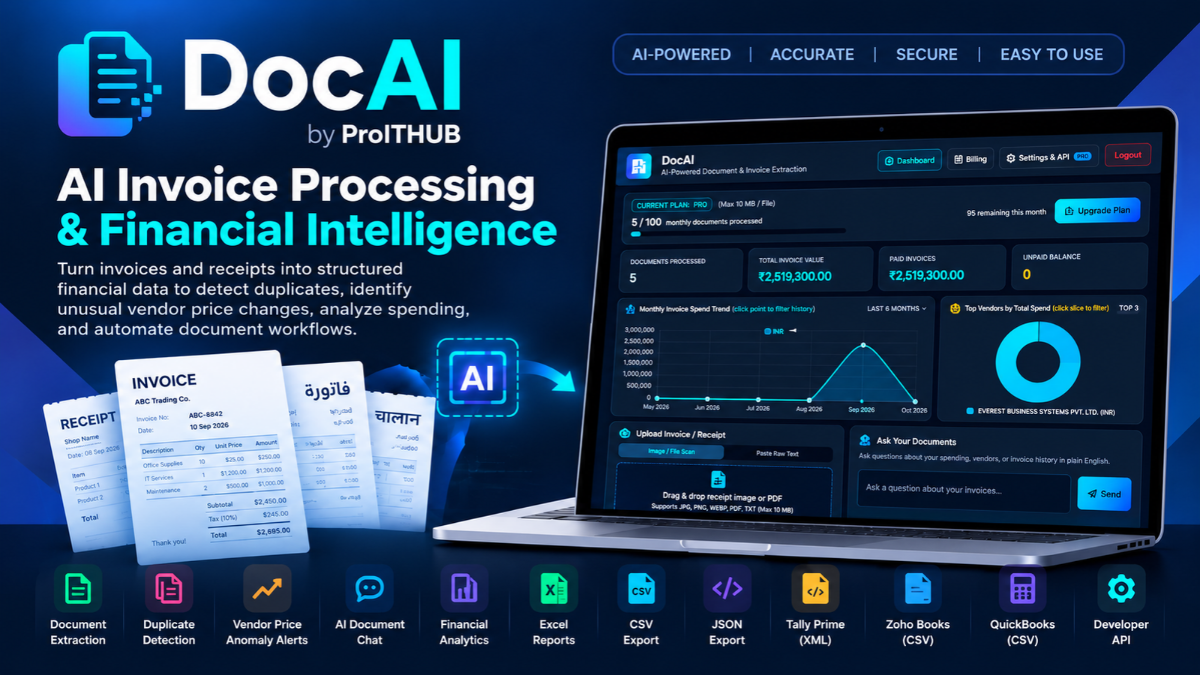
Turn invoices and receipts into structured financial data to detect duplicates, identify unusual vendor price changes, analyze spending, and automate document workflows.
Businesses process invoices in different formats, currencies, and languages every day. Extracting information is only one part of the job. Finance teams also need to organize records, verify payment statuses, identify duplicate invoices, understand vendor spending, and transfer data into accounting systems.
That is why we built DocAI by ProITHUB—an AI-powered document and invoice processing platform designed to help businesses transform invoices, receipts, PDFs, and images into structured, searchable financial records.
DocAI goes beyond basic data extraction. It combines document intelligence, invoice analytics, duplicate detection, vendor price anomaly detection, AI-powered document chat, accounting exports, and a Developer API in one platform.
DocAI is now available. Watch the launch video below to see how it works in a live demonstration.
Watch the DocAI Launch & Live Demo
In this demonstration, we walk through the DocAI dashboard, process documents, explore extracted financial information, review invoice analytics, query document history using AI, and demonstrate the available export and integration capabilities.
What Is DocAI?
DocAI is an AI-powered document and invoice intelligence platform that helps users convert unstructured financial documents into structured records they can review, analyze, search, and export.
Instead of manually copying invoice details into spreadsheets, users can upload supported documents, review the extracted information, and use the resulting records across their financial workflows.
DocAI is designed for finance teams, accountants, business owners, and IT professionals who want to reduce repetitive document processing and make better use of their invoice data.
Core Features of DocAI
1. AI Document & Invoice Extraction
Upload invoices, receipts, PDFs, images, or paste raw text to extract key information into structured fields.
DocAI can extract details such as:
- Vendor and supplier information
- Invoice numbers and dates
- Invoice totals and taxes
- Payment status
- Individual invoice line items
- Other available invoice and financial fields
The extracted information can be reviewed and edited before records are finalized or exported.
2. Duplicate Invoice Detection
Duplicate invoices can lead to repeated processing and potential double payments.
DocAI compares new uploads against previously processed document history to identify potential duplicate invoices.
This helps users investigate repeated invoice numbers, previously processed records, and possible duplicate billing before taking further action.
The goal is to make duplicate detection part of the document-processing workflow rather than relying entirely on manual checks.
3. Vendor Price Anomaly Detection
Vendor prices can change over time, and unusual increases may go unnoticed when invoices are reviewed individually.
DocAI analyzes recurring vendor line items across historical invoices and flags significant price increases, including increases of 10% or more under its configured detection rules.
This can help users investigate:
- Unexpected increases in recurring item prices
- Changes in vendor pricing across invoices
- Potential overcharges
- Unusual differences that warrant further review
These alerts are indicators for investigation, not automatic proof of an error or overcharge.
4. AI Document Chat — Ask Your Documents
Your processed invoice history contains useful information, but finding a specific detail across many records can be time-consuming.
With DocAI’s AI-powered document chat, users can ask questions about their invoice history in plain English.
For example:
- “What was our total spend with Everest Systems?”
- “Do we have any unpaid invoices?”
- “Show me the details for a particular invoice number.”
- “Which vendors account for the highest spending?”
- “What is the outstanding balance in our records?”
Instead of searching through individual files and spreadsheets, users can query their available document records conversationally.
5. Financial Dashboard & Invoice Analytics
DocAI provides a dashboard for understanding processed documents and the financial information they contain.
The dashboard includes:
- Total documents processed
- Total invoice value
- Paid invoice amounts
- Unpaid balances
- Monthly invoice spending trends
- Top vendors by total spend
- Historical document records
Multi-currency visibility helps users work with invoice values recorded in currencies such as INR, USD, SAR, and EUR without treating every amount as though it belongs to the same currency.
This makes the dashboard useful for reviewing invoice activity across vendors and currencies. Amounts in different currencies should be interpreted separately unless an explicit currency-conversion method is applied.
6. Document History & Searchable Records
Previously processed documents remain available in the document history for reference and review.
Users can inspect records and view important details such as the vendor or filename, invoice number, date, total amount, payment status, and processing timestamp.
The history also supports access to individual record exports, making it easier to revisit processed invoices without repeating the entire workflow.
7. Edit Extracted Data Before Export
AI extraction should not remove the user’s ability to verify information.
DocAI allows users to review and edit extracted fields and line items before exporting or finalizing records. This provides an opportunity to correct extraction errors and verify important financial details.
For financial workflows, human review remains important, particularly when handling tax identifiers, invoice totals, payment information, and other critical records.
8. Excel, CSV, JSON & Accounting Software Exports
Extracted invoice information becomes more useful when it can be reviewed, analyzed, and used in other applications.
DocAI supports structured exports in several formats:
- Excel Reports: Review and analyze invoice records in spreadsheet workflows.
- CSV: Use structured data in spreadsheets and compatible business applications.
- JSON: Work with structured data in software and integration workflows.
- Tally Prime (XML): Export invoice information in XML format for supported Tally Prime workflows.
- Zoho Books (CSV): Export data in CSV format for supported workflows.
- QuickBooks (CSV): Export data in CSV format for supported workflows.
The available export options depend on the user’s subscription plan.
These formats help users prepare extracted invoice information for use in supported accounting workflows. Review exported files and confirm field mappings and import requirements before importing financial records into your accounting software.
9. Developer API & API Key Integration
One of DocAI’s important capabilities is its Developer API, which extends document processing beyond the web dashboard.
Businesses and developers can use the API to integrate supported document-processing workflows into their own software and applications.
The available Developer API interface includes:
- API key-based access
- A dedicated API endpoint
- JSON payloads for programmatic workflows
- Integration possibilities for existing applications and business processes
This makes DocAI relevant not only to people who process invoices through a web dashboard, but also to developers and businesses that want to incorporate document extraction into their existing systems.
For example, a business could integrate document processing into an internal application instead of requiring employees to perform every step through a browser.
Developers should consult the available API documentation for the exact endpoint, authentication requirements, request schema, response fields, usage limits, and supported operations.
10. Multilingual Document Processing
Business documents do not always arrive in English.
DocAI has been developed and tested with invoices in multiple languages, including Hindi, Marathi, Telugu, and Arabic, alongside other invoice formats.
The objective is to make structured invoice extraction useful for businesses that receive documents from different regions and suppliers.
As with any AI-powered extraction system, results can vary depending on document quality, layout, language, and text clarity. Review important extracted fields before relying on them for financial decisions.
How DocAI Works in Four Steps
Step 1 – Upload Your Document
Upload an invoice, receipt, PDF, or image, or paste raw text into the available input workflow.
Step 2 – Extract Structured Information
DocAI processes the input and extracts available invoice fields, totals, taxes, vendor details, and line items.
Step 3 – Check Duplicates and Anomalies
The platform checks document history for potential duplicates and analyzes vendor pricing for unusual changes.
Step 4 – Review, Query, and Export
Review or edit the extracted data, ask questions about document history, analyze dashboard metrics, export financial records, or use the Developer API for supported integrations.
Who Can Benefit from DocAI?
DocAI can be useful for:
- Small and medium-sized businesses that process supplier invoices and receipts.
- Accountants and bookkeeping teams that organize financial documents.
- Finance departments that need visibility into vendor spending and unpaid balances.
- Businesses working with multiple currencies that need to keep invoice records organized by currency.
- Developers and IT teams that want to integrate document processing into existing software.
- Organizations with recurring vendor purchases that want to identify potential duplicate invoices and unusual price changes.
The right fit depends on document volume, required accuracy, existing accounting workflows, and the integrations a business needs.
Why We Built DocAI
At ProITHUB, we believe AI becomes more useful when it solves a practical workflow rather than simply generating answers.
Invoice processing is a good example. Extracting a few fields is helpful, but the larger opportunity is connecting extraction with history, analytics, anomaly detection, conversational search, exports, and programmatic integration.
DocAI brings these capabilities together so users can move from raw documents to structured financial information and actionable checks within one workflow.
Our aim is to continue improving the platform based on real-world usage and feedback.
Get Started with DocAI
Ready to explore AI-powered invoice processing and financial document intelligence?
Visit DocAI to explore the platform and choose the plan that matches your document-processing needs.
Website: https://docai.proithub.com/
Contact Us for the DocAI Launch Offer
Interested in trying DocAI or discussing the right plan for your workflow? Contact our team for launch-offer details, product demonstrations, business enquiries, or partnership opportunities.
Email: support@proithub.com
WhatsApp: +91 90001 46566
Chartered Accountants (CAs), accountants, consultants, and IT service providers interested in introducing DocAI to their clients can contact us to discuss commission-based referral opportunities and partnership terms.
We welcome feedback from businesses, finance professionals, and developers as we continue building DocAI.
DocAI by ProITHUB – From documents to structured financial intelligence.


